
 >[!TIP]
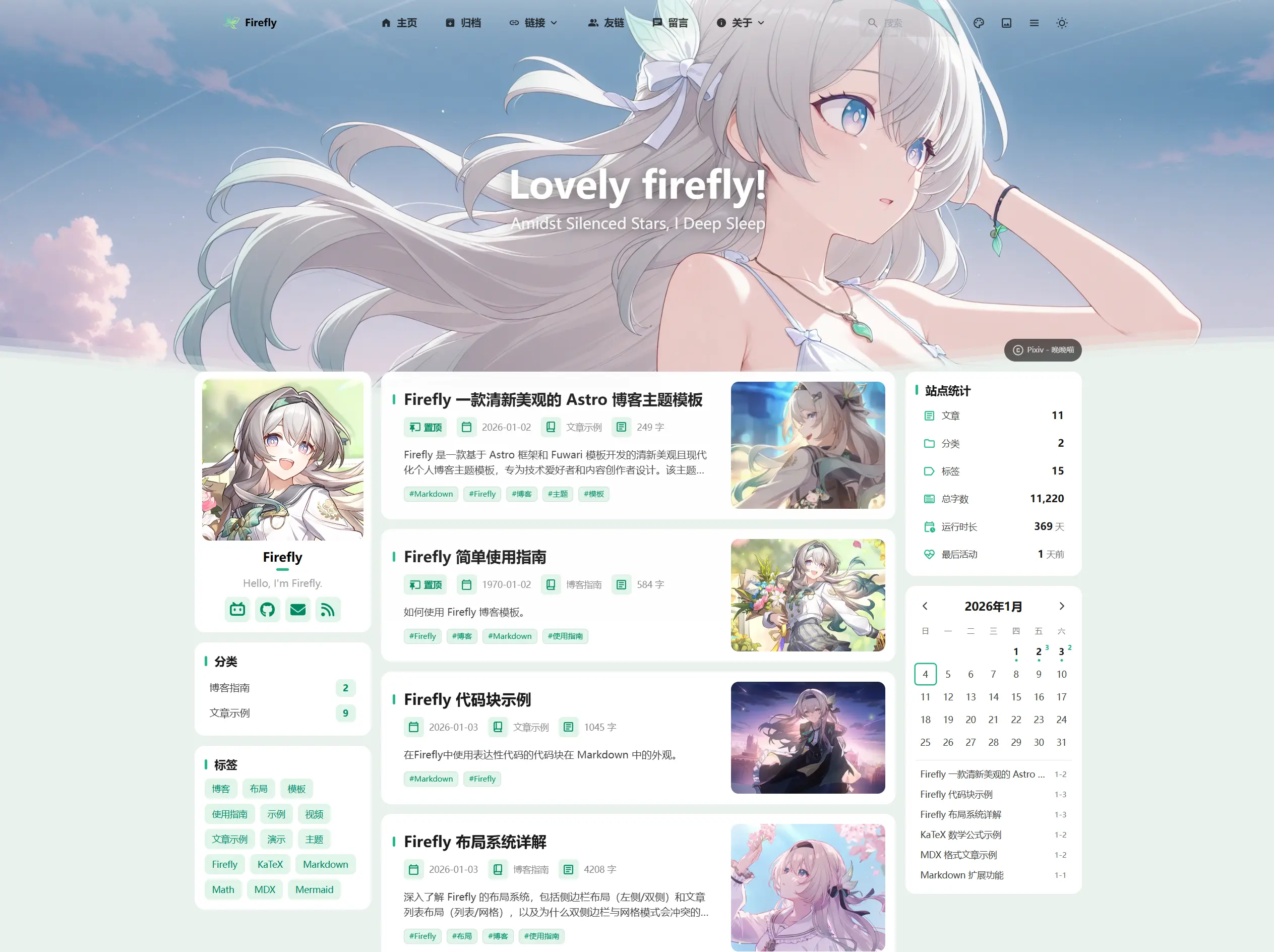
>在重要的版面配置上,Firefly創新性地增加了左右雙側邊欄、文章網格(多列)版面配置,
>
>增加了站點統計、日曆元件、文章目錄等小元件,讓側邊欄更加豐富,
>
>同時也保留了 fuwari 的版面配置系統,可在配置檔案中自由切換。
>
>**更多版面配置及示範請查看:[Firefly 版面配置系統詳解](https://firefly.cuteleaf.cn/posts/firefly-layout-system/)**
## ✨ 功能特性
### 核心功能
- [x] **Astro + Tailwind CSS** - 基於現代技術堆疊的超快靜態站點生成
- [x] **流暢動畫** - Swup 頁面過渡動畫,提供絲滑的瀏覽體驗
- [x] **響應式設計** - 完美適配桌面端、平板和行動裝置
- [x] **多語言支援** - i18n 國際化,支援簡體中文、繁體中文、英文、日文、俄語
- [x] **全文搜尋** - 基於 Pagefind 的客戶端搜尋,支援文章內容索引。同時支援 MeiliSearch 搜尋引擎
### 個性化
- [x] **側邊欄** - 支援配置單側邊欄、雙側邊欄,支援前台自由切換
- [x] **文章版面配置** - 支援配置(單列)列表、網格(多列/瀑布流)版面配置,支援前台自由切換
- [x] **字型管理** - 支援自訂字型,豐富的字型選擇器
- [x] **頁尾配置** - HTML 內容注入,完全自訂
- [x] **導覽列自訂** - Logo、標題、連結全面自訂
- [x] **桌布模式切換** - 橫幅桌布、全螢幕桌布、純色背景,支援前台自由切換
- [x] **主題色自訂** - 360° 色相調節,支援亮色/暗色/跟隨系統三種模式,支援前台自由切換
### 頁面元件
- [x] **留言板** - 支援留言頁面,整合留言系統
- [x] **公告欄** - 頂部公告提示,支援關閉和自訂樣式
- [x] **看板娘** - 支援 Spine 和 Live2D 兩種動畫引擎
- [x] **站點統計** - 顯示文章、分類、標籤數目、文章總字數、執行時長、最後更新時間
- [x] **站點日曆** - 顯示當月日曆,以及當月的發布文章
- [x] **贊助頁面** - 多種支付方式、收款碼展示、贊助者列表、文章內贊助按鈕
- [x] **分享海報** - 支援生成精美的文章分享海報,包含文章摘要、二維碼等資訊
- [x] **櫻花特效** - 支援櫻花特效,全螢幕櫻花效果
- [x] **友情連結** - 精美的友鏈展示卡片
- [x] **廣告元件** - 支援自訂側邊欄廣告內容
- [x] **番組計畫** - 基於 Bangumi API 的追番和遊戲記錄展示
- [x] **留言系統** - 整合 Twikoo、Waline、Giscus、Disqus、Artalk 留言系統
- [x] **訪問量統計** - 支援呼叫 Waline、Twikoo 自帶的訪問量追蹤
- [x] **音樂播放器** - 基於 APlayer,支援本地音樂和 Meting API 線上音樂
### 內容增強
- [x] **圖片燈箱** - Fancybox 圖片預覽功能
- [x] **浮動目錄** - 動態顯示文章目錄,支援錨點跳轉,在側邊欄目錄隱藏後顯示
- [x] **信箱保護** - 讓自動化爬蟲程式無法直接爬取信箱地址,避免垃圾郵件騷擾
- [x] **側邊欄目錄** - 動態顯示文章目錄,支援錨點跳轉
- [x] **增強程式碼區塊** - 基於 Expressive Code,支援程式碼摺疊、行號、語言標識
- [x] **數學公式支援** - KaTeX 渲染引擎,支援行內和區塊級公式
- [x] **Markdown擴充** - 預設支援[GitHub Flavored Markdown](https://github.github.com/gfm/),還包括了[Admonitions](https://firefly.cuteleaf.cn/posts/markdown-extended/#%E6%8F%90%E9%86%92%E6%A1%86)、[GitHub repository cards](https://firefly.cuteleaf.cn/posts/markdown-extended/#github-%E4%BB%93%E5%BA%93%E5%8D%A1%E7%89%87)、[Expressive Code](http://firefly.cuteleaf.cn/posts/code-examples/)
- [x] **文章隨機封面圖** - 支援透過 API 獲取隨機封面圖
### SEO
- [x] **SEO 優化** - 完整的 meta 標籤和結構化資料
- [x] **RSS 訂閱** - 自動生成 RSS Feed
- [x] **站點地圖** - 自動生成 XML Sitemap,支援頁面篩選配置
## 📝計畫中...
- [ ] **重構 Live2D 看板娘**
- [ ] **持續優化動畫流暢度**
- [ ] 更多功能持續完善中...
如果你有好用的功能和優化,請提交 [Pull Request](https://github.com/CuteLeaf/Firefly/pulls)
## 🚀 快速開始
### 環境要求
- Node.js ≤ 22
- pnpm ≤ 9
### 本地開發部署
1. **克隆儲存庫:**
```bash
git clone https://github.com/Cuteleaf/Firefly.git
cd Firefly
```
**先 [Fork](https://github.com/CuteLeaf/Firefly/fork) 到自己儲存庫再克隆(推薦)**
```bash
git clone https://github.com/you-github-name/Firefly.git
cd Firefly
```
3. **安裝依賴:**
```bash
# 如果沒有安裝 pnpm,先安裝
npm install -g pnpm
# 安裝專案依賴
pnpm install
```
4. **配置部落格:**
- 編輯 `src/config/` 目錄下的配置檔案自訂部落格設定
5. **啟動開發伺服器:**
```bash
pnpm dev
```
部落格將在 `http://localhost:4321` 可用
### 平台託管部署
- **參考[官方指南](https://docs.astro.build/zh-cn/guides/deploy/)將部落格部署至 Vercel, Netlify, GitHub Pages, Cloudflare Pages, EdgeOne Pages 等。**
框架預設: `Astro`
根目錄: `./`
輸出目錄: `dist`
建置命令: `pnpm run build`
安裝命令: `pnpm install`
## 📖 配置說明
> 📚 **詳細配置文檔**: 查看 [Firefly使用文檔](https://docs-firefly.cuteleaf.cn/) 獲取完整的配置指南
### 設定網站語言
要設定部落格的預設語言,請編輯 `src/config/siteConfig.ts` 檔案:
```typescript
// 定義站點語言
const SITE_LANG = "zh_CN";
```
**支援的語言代碼:**
- `zh_CN` - 簡體中文
- `zh_TW` - 繁體中文
- `en` - 英文
- `ja` - 日文
- `ru` - 俄文
### 配置檔案結構
```
src/
├── config/
│ ├── index.ts # 配置索引檔案
│ ├── siteConfig.ts # 站點基礎配置
│ ├── backgroundWallpaper.ts # 背景桌布配置
│ ├── profileConfig.ts # 使用者資料配置
│ ├── commentConfig.ts # 留言系統配置
│ ├── announcementConfig.ts # 公告配置
│ ├── licenseConfig.ts # 授權配置
│ ├── footerConfig.ts # 頁尾配置
│ ├── FooterConfig.html # 頁尾HTML內容
│ ├── expressiveCodeConfig.ts # 程式碼高亮配置
│ ├── sakuraConfig.ts # 櫻花特效配置
│ ├── fontConfig.ts # 字型配置
│ ├── sidebarConfig.ts # 側邊欄版面配置配置
│ ├── navBarConfig.ts # 導覽列配置
│ ├── musicConfig.ts # 音樂播放器配置
│ ├── pioConfig.ts # 看板娘配置
│ ├── adConfig.ts # 廣告配置
│ ├── friendsConfig.ts # 友鏈配置
│ ├── sponsorConfig.ts # 贊助配置
│ └── coverImageConfig.ts # 文章隨機封面圖配置
```
## ⚙️ 文章 Frontmatter
```yaml
---
title: My First Blog Post
published: 2023-09-09
description: This is the first post of my new Astro blog.
image: ./cover.jpg # 或使用 "api" 來啟用隨機封面圖
tags: [Foo, Bar]
category: Front-end
draft: false
lang: zh-CN # 僅當文章語言與 `siteConfig.ts` 中的網站語言不同時需要設定
---
```
## 🧞 指令
下列指令均需要在專案根目錄執行:
| Command | Action |
|:---------------------------|:----------------------------------------------------|
| `pnpm install` | 安裝依賴 |
| `pnpm dev` | 在 `localhost:4321` 啟動本地開發伺服器 |
| `pnpm build` | 建置網站至 `./dist/` |
| `pnpm preview` | 本地預覽已建置的網站 |
| `pnpm check` | 檢查程式碼中的錯誤 |
| `pnpm format` | 使用 Biome 格式化您的程式碼 |
| `pnpm new-post
>[!TIP]
>在重要的版面配置上,Firefly創新性地增加了左右雙側邊欄、文章網格(多列)版面配置,
>
>增加了站點統計、日曆元件、文章目錄等小元件,讓側邊欄更加豐富,
>
>同時也保留了 fuwari 的版面配置系統,可在配置檔案中自由切換。
>
>**更多版面配置及示範請查看:[Firefly 版面配置系統詳解](https://firefly.cuteleaf.cn/posts/firefly-layout-system/)**
## ✨ 功能特性
### 核心功能
- [x] **Astro + Tailwind CSS** - 基於現代技術堆疊的超快靜態站點生成
- [x] **流暢動畫** - Swup 頁面過渡動畫,提供絲滑的瀏覽體驗
- [x] **響應式設計** - 完美適配桌面端、平板和行動裝置
- [x] **多語言支援** - i18n 國際化,支援簡體中文、繁體中文、英文、日文、俄語
- [x] **全文搜尋** - 基於 Pagefind 的客戶端搜尋,支援文章內容索引。同時支援 MeiliSearch 搜尋引擎
### 個性化
- [x] **側邊欄** - 支援配置單側邊欄、雙側邊欄,支援前台自由切換
- [x] **文章版面配置** - 支援配置(單列)列表、網格(多列/瀑布流)版面配置,支援前台自由切換
- [x] **字型管理** - 支援自訂字型,豐富的字型選擇器
- [x] **頁尾配置** - HTML 內容注入,完全自訂
- [x] **導覽列自訂** - Logo、標題、連結全面自訂
- [x] **桌布模式切換** - 橫幅桌布、全螢幕桌布、純色背景,支援前台自由切換
- [x] **主題色自訂** - 360° 色相調節,支援亮色/暗色/跟隨系統三種模式,支援前台自由切換
### 頁面元件
- [x] **留言板** - 支援留言頁面,整合留言系統
- [x] **公告欄** - 頂部公告提示,支援關閉和自訂樣式
- [x] **看板娘** - 支援 Spine 和 Live2D 兩種動畫引擎
- [x] **站點統計** - 顯示文章、分類、標籤數目、文章總字數、執行時長、最後更新時間
- [x] **站點日曆** - 顯示當月日曆,以及當月的發布文章
- [x] **贊助頁面** - 多種支付方式、收款碼展示、贊助者列表、文章內贊助按鈕
- [x] **分享海報** - 支援生成精美的文章分享海報,包含文章摘要、二維碼等資訊
- [x] **櫻花特效** - 支援櫻花特效,全螢幕櫻花效果
- [x] **友情連結** - 精美的友鏈展示卡片
- [x] **廣告元件** - 支援自訂側邊欄廣告內容
- [x] **番組計畫** - 基於 Bangumi API 的追番和遊戲記錄展示
- [x] **留言系統** - 整合 Twikoo、Waline、Giscus、Disqus、Artalk 留言系統
- [x] **訪問量統計** - 支援呼叫 Waline、Twikoo 自帶的訪問量追蹤
- [x] **音樂播放器** - 基於 APlayer,支援本地音樂和 Meting API 線上音樂
### 內容增強
- [x] **圖片燈箱** - Fancybox 圖片預覽功能
- [x] **浮動目錄** - 動態顯示文章目錄,支援錨點跳轉,在側邊欄目錄隱藏後顯示
- [x] **信箱保護** - 讓自動化爬蟲程式無法直接爬取信箱地址,避免垃圾郵件騷擾
- [x] **側邊欄目錄** - 動態顯示文章目錄,支援錨點跳轉
- [x] **增強程式碼區塊** - 基於 Expressive Code,支援程式碼摺疊、行號、語言標識
- [x] **數學公式支援** - KaTeX 渲染引擎,支援行內和區塊級公式
- [x] **Markdown擴充** - 預設支援[GitHub Flavored Markdown](https://github.github.com/gfm/),還包括了[Admonitions](https://firefly.cuteleaf.cn/posts/markdown-extended/#%E6%8F%90%E9%86%92%E6%A1%86)、[GitHub repository cards](https://firefly.cuteleaf.cn/posts/markdown-extended/#github-%E4%BB%93%E5%BA%93%E5%8D%A1%E7%89%87)、[Expressive Code](http://firefly.cuteleaf.cn/posts/code-examples/)
- [x] **文章隨機封面圖** - 支援透過 API 獲取隨機封面圖
### SEO
- [x] **SEO 優化** - 完整的 meta 標籤和結構化資料
- [x] **RSS 訂閱** - 自動生成 RSS Feed
- [x] **站點地圖** - 自動生成 XML Sitemap,支援頁面篩選配置
## 📝計畫中...
- [ ] **重構 Live2D 看板娘**
- [ ] **持續優化動畫流暢度**
- [ ] 更多功能持續完善中...
如果你有好用的功能和優化,請提交 [Pull Request](https://github.com/CuteLeaf/Firefly/pulls)
## 🚀 快速開始
### 環境要求
- Node.js ≤ 22
- pnpm ≤ 9
### 本地開發部署
1. **克隆儲存庫:**
```bash
git clone https://github.com/Cuteleaf/Firefly.git
cd Firefly
```
**先 [Fork](https://github.com/CuteLeaf/Firefly/fork) 到自己儲存庫再克隆(推薦)**
```bash
git clone https://github.com/you-github-name/Firefly.git
cd Firefly
```
3. **安裝依賴:**
```bash
# 如果沒有安裝 pnpm,先安裝
npm install -g pnpm
# 安裝專案依賴
pnpm install
```
4. **配置部落格:**
- 編輯 `src/config/` 目錄下的配置檔案自訂部落格設定
5. **啟動開發伺服器:**
```bash
pnpm dev
```
部落格將在 `http://localhost:4321` 可用
### 平台託管部署
- **參考[官方指南](https://docs.astro.build/zh-cn/guides/deploy/)將部落格部署至 Vercel, Netlify, GitHub Pages, Cloudflare Pages, EdgeOne Pages 等。**
框架預設: `Astro`
根目錄: `./`
輸出目錄: `dist`
建置命令: `pnpm run build`
安裝命令: `pnpm install`
## 📖 配置說明
> 📚 **詳細配置文檔**: 查看 [Firefly使用文檔](https://docs-firefly.cuteleaf.cn/) 獲取完整的配置指南
### 設定網站語言
要設定部落格的預設語言,請編輯 `src/config/siteConfig.ts` 檔案:
```typescript
// 定義站點語言
const SITE_LANG = "zh_CN";
```
**支援的語言代碼:**
- `zh_CN` - 簡體中文
- `zh_TW` - 繁體中文
- `en` - 英文
- `ja` - 日文
- `ru` - 俄文
### 配置檔案結構
```
src/
├── config/
│ ├── index.ts # 配置索引檔案
│ ├── siteConfig.ts # 站點基礎配置
│ ├── backgroundWallpaper.ts # 背景桌布配置
│ ├── profileConfig.ts # 使用者資料配置
│ ├── commentConfig.ts # 留言系統配置
│ ├── announcementConfig.ts # 公告配置
│ ├── licenseConfig.ts # 授權配置
│ ├── footerConfig.ts # 頁尾配置
│ ├── FooterConfig.html # 頁尾HTML內容
│ ├── expressiveCodeConfig.ts # 程式碼高亮配置
│ ├── sakuraConfig.ts # 櫻花特效配置
│ ├── fontConfig.ts # 字型配置
│ ├── sidebarConfig.ts # 側邊欄版面配置配置
│ ├── navBarConfig.ts # 導覽列配置
│ ├── musicConfig.ts # 音樂播放器配置
│ ├── pioConfig.ts # 看板娘配置
│ ├── adConfig.ts # 廣告配置
│ ├── friendsConfig.ts # 友鏈配置
│ ├── sponsorConfig.ts # 贊助配置
│ └── coverImageConfig.ts # 文章隨機封面圖配置
```
## ⚙️ 文章 Frontmatter
```yaml
---
title: My First Blog Post
published: 2023-09-09
description: This is the first post of my new Astro blog.
image: ./cover.jpg # 或使用 "api" 來啟用隨機封面圖
tags: [Foo, Bar]
category: Front-end
draft: false
lang: zh-CN # 僅當文章語言與 `siteConfig.ts` 中的網站語言不同時需要設定
---
```
## 🧞 指令
下列指令均需要在專案根目錄執行:
| Command | Action |
|:---------------------------|:----------------------------------------------------|
| `pnpm install` | 安裝依賴 |
| `pnpm dev` | 在 `localhost:4321` 啟動本地開發伺服器 |
| `pnpm build` | 建置網站至 `./dist/` |
| `pnpm preview` | 本地預覽已建置的網站 |
| `pnpm check` | 檢查程式碼中的錯誤 |
| `pnpm format` | 使用 Biome 格式化您的程式碼 |
| `pnpm new-post